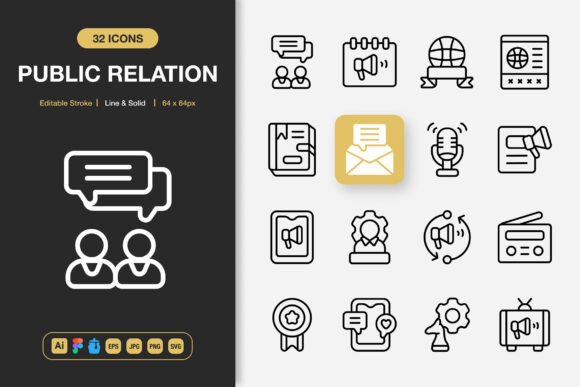
Public Relation Icons: The Ultimate Toolkit for Modern Communication Design
In the professional world of communication and marketing, visual clarity is paramount. Whether you're crafting a brand report, designing a campaign website, or creating an investor presentation, the icons you use serve as critical visual shorthand. They guide the viewer, establish tone, and reinforce messaging. Public Relation Icons is not merely a set of graphics; it is a comprehensive, process-integrated asset designed to elevate the visual language of public relations, corporate communication, and beyond. This collection fits directly into the workflow of professionals who need to move from concept to polished execution efficiently, ensuring consistency and quality across every touchpoint.
Integrating a Visual Asset into Your Creative Process
Every project follows a trajectory: planning, asset gathering, execution, and delivery. Where does a specialized icon set fit in? For many, the search for suitable icons often occurs mid-project, becoming a disruptive, time-consuming task that can compromise visual consistency. Public Relation Icons shifts this dynamic. It becomes a foundational asset acquired or referenced during the preparation phase. By having this toolkit ready at the outset, designers, marketers, and content creators can make informed layout decisions early, knowing the precise visual elements they will deploy.
Consider the typical workflow for a social media campaign rollout. The process involves storyboarding content, designing posts, preparing blog graphics, and creating internal briefing documents. A disjointed set of icons from various sources can create a jarring visual experience. Integrating Public Relation Icons at the storyboarding stage allows for the creation of a unified style guide. You can specify the use of its "Line" style for sophisticated infographics and its "Solid" style for bold, attention-grabbing banners, ensuring every piece of collateral feels part of a cohesive campaign from the first sketch to the final publish.
Preparing Your Workspace for Consistency and Efficiency
Preparation is about reducing friction. Before diving into design software, organizing your assets is a crucial step. The included file formats—Adobe Illustrator source files, Figma files, IconJar, EPS, SVG, and PNG—are deliberate choices for professional compatibility. Here's a practical implementation tip: upon receiving the set, spend 15 minutes auditing your typical projects. Do you primarily work in Figma for app interfaces? Import the Figma file into your team library. Is your core output print collateral? Organize the EPS and high-resolution PNG files into a dedicated "PR Assets" folder on your server. This small organizational act means that during the execution phase, you aren't searching; you're simply dragging and dropping.
The editable stroke feature is a prime example of a tool that interacts directly with your decision-making during execution. Perhaps a client feedback note requests a slightly thicker line weight for better visibility on mobile screens. Instead of abandoning an icon or starting from scratch, you can adjust the stroke within the source file in minutes, maintaining the original design intent and saving valuable revision time. This level of control directly impacts quality control and client satisfaction.
From Digital Apps to Print Banners: A Universal Application Set
The true test of a professional asset is its adaptability across mediums. The description "suitable for any project" is validated by the specific use cases mentioned: websites, mobile apps, books, social media, infographics, flyers, print, banners, posters, and many more. Each of these outputs has unique technical and aesthetic requirements.
For a digital product manager overseeing a website and mobile app redesign, using the same icon set across both platforms is essential for brand unity. The SVG files from Public Relation Icons provide scalability and crisp rendering on any screen size, while the PNG files with transparency are ready for immediate use in social media graphics or email newsletters. Meanwhile, a publication designer working on a corporate annual report—a print and PDF document—can utilize the high-quality JPG and EPS files. The consistency in icon design ensures the report's digital PDF mirrors its printed counterpart perfectly, a detail that speaks to professional polish.
Collaboration and Team-Based Workflows
Modern projects rarely exist in isolation; they involve teams of designers, writers, marketers, and developers. How does an icon set interact with people and other tools in a collaborative environment? The provision of multiple source and application-specific files facilitates seamless handoffs. A designer can finalize the icon style and color in the Adobe Illustrator source file, then provide the developer with the exported SVG files for implementation in the website code. The Figma file allows entire UX/UI teams to work with the icons natively within their prototyping environment. Including a Readme.txt file standardizes basic instructions, reducing onboarding time for new team members or external contractors. This minimizes miscommunication and ensures the asset is used correctly, protecting the integrity of the project's visual language.
Long-Term Value and Asset Management
Investing in a high-quality, customizable icon set is a decision that pays dividends over time, beyond a single project. For a freelance creator or small business owner, building a reusable library of assets is key to long-term efficiency. Public Relation Icons, with its 100 customizable icons covering common PR and business themes—like communication, networking, media, analysis, and growth—becomes a core part of that library.
Think of your next projects. A minimalist icon design philosophy ensures the icons remain relevant and visually clean, avoiding the trend-heavy styles that quickly date. When a future project for a different client arises—perhaps a community outreach flyer or an investor relations presentation—you can return to the same set. By slightly modifying colors (thanks to the editable source files) or choosing a different style (Line vs. Solid), you can tailor the icons to the new brand without starting a fresh search. This not only speeds up your workflow but also helps you establish a consistent quality level across your entire portfolio of work.
Practical Tips for Immediate Implementation
To integrate this toolkit smoothly into your routine, consider a staged approach. Start by applying it to one active, mid-scale project, such as a set of blog graphics or a presentation deck. This gives you hands-on experience with the drag-and-drop ease and file formats. Observe how it affects your speed and the final aesthetic. Next, formalize its place by adding the icon set to your organization's digital asset management system or your personal creative boilerplate folder. Finally, advocate for its use in team style guides or client brand guidelines when appropriate, positioning it as a standard for visual communication elements.
The outcome of using a well-structured asset like this is a more streamlined process, a higher consistency in output, and a reduction in the low-level friction that often slows down creative execution. By focusing on the integration points—planning, collaboration, cross-platform use, and long-term asset management—Public Relation Icons proves to be more than just icons. It becomes a reliable component in your professional workflow, enabling you to focus less on finding the right graphic and more on crafting the right message.